Section 3.6: Agentic System Guardrails
Agentic AI systems represent a fundamental escalation in the stakes of guardrail design. A traditional chat application generates text — if the guardrails fail, the worst case is harmful words on a screen. An agentic system takes actions: it calls APIs, queries databases, sends emails, executes code, and modifies state in external systems. When its guardrails fail, the consequences are not just informational but operational.
An agent that executes a DELETE query against a production database, sends confidential information to the wrong recipient, or purchases unauthorized resources is not producing “bad output” — it is causing real-world damage that may be difficult or impossible to reverse.
This section covers the guardrail architectures that constrain agentic systems, from tool use policies to multi-agent trust boundaries.
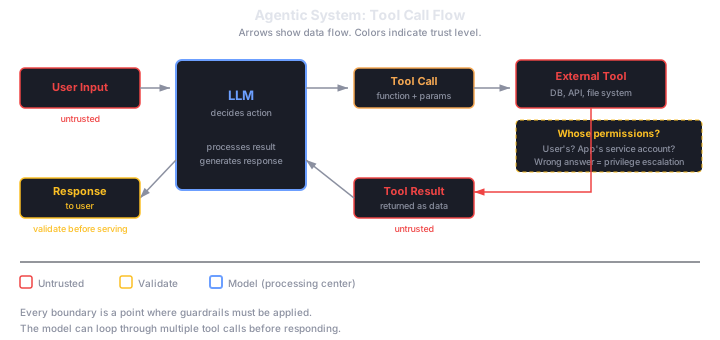
The Agent Action Loop
To understand where guardrails fit in agentic systems, you need to understand the basic agent action loop:
- The agent receives a user request or objective
- The agent reasons about what actions to take (planning)
- The agent selects a tool and generates tool call parameters
- The tool call is executed against an external system
- The agent observes the result
- The agent decides whether to take another action or respond to the user
Guardrails can be applied at every step of this loop, but the most critical points are between steps 3 and 4 (before action execution) and between steps 5 and 6 (before the agent uses the result to take further actions).
Tool Use Policies
Tool use policies are the most fundamental agentic guardrail. They define which tools the agent can call, with what parameters, and under what conditions. Think of them as access control lists for agent capabilities.
An effective tool use policy specifies:
Allowed tools. Which tools are available to the agent. An agent designed for customer support has no business calling a code execution tool.
Parameter constraints. For each tool, what parameter values are permitted. A database query tool might allow SELECT but not DELETE. A file system tool might allow reads from a specific directory but not writes.
Conditional access. Some tools should only be available under certain conditions. A refund tool might require that the conversation has verified the customer’s identity. A deployment tool might only be available during business hours.
Rate limits per tool. Beyond overall rate limiting, individual high-impact tools should have their own rate limits. An agent should not be able to send 100 emails in a single session, even if each individual email passes policy checks.
TOOL_POLICY = {
    "search_knowledge_base": {
        "allowed": True,
        "rate_limit": 20,  # per session
        "parameter_constraints": {},
    },
    "query_database": {
        "allowed": True,
        "rate_limit": 10,
        "parameter_constraints": {
            "operation": ["SELECT"],
            "tables": ["products", "orders", "faq"],
        },
    },
    "send_email": {
        "allowed": True,
        "rate_limit": 3,
        "parameter_constraints": {
            "recipient_domain": ["@company.com"],
        },
        "requires_confirmation": True,
    },
    "execute_code": {
        "allowed": False,
    },
    "process_refund": {
        "allowed": True,
        "rate_limit": 1,
        "requires_confirmation": True,
        "preconditions": ["identity_verified"],
    },
}
Why this matters for guardrails: Tool use policies enforce the principle of least privilege at the agent level. An agent should have access to exactly the tools it needs for its task, with exactly the parameter ranges it needs, and no more. Unlike system prompt instructions that ask the model to limit itself, tool use policies are enforced by the runtime — the model literally cannot call a tool that is not in its policy.
Action Confirmation Workflows
For high-impact actions — those that modify state, spend money, send communications, or are difficult to reverse — the guardrail architecture should require explicit confirmation before execution.
Confirmation can come from different sources depending on the risk level:
┌────────────────────────────────────────────────────┐
│           Agent Permission Boundary Model           │
│                                                    │
│  ┌──────────────────────────────────────────────┐  │
│  │           Tier 1: Auto-Approved               │  │
│  │  Read-only operations, low-cost actions       │  │
│  │  Examples: search, retrieve, calculate        │  │
│  │  ─────────────────────────────────────────    │  │
│  │  Guardrail: Policy check only (< 1ms)        │  │
│  └──────────────────────────────────────────────┘  │
│                                                    │
│  ┌──────────────────────────────────────────────┐  │
│  │           Tier 2: User-Confirmed              │  │
│  │  Reversible state changes, moderate cost      │  │
│  │  Examples: send message, create record        │  │
│  │  ─────────────────────────────────────────    │  │
│  │  Guardrail: Show user what will happen,       │  │
│  │  require explicit "Yes, proceed"              │  │
│  └──────────────────────────────────────────────┘  │
│                                                    │
│  ┌──────────────────────────────────────────────┐  │
│  │           Tier 3: Supervisor-Approved         │  │
│  │  Irreversible actions, high cost, sensitive   │  │
│  │  Examples: delete data, process payment,      │  │
│  │           deploy to production                │  │
│  │  ─────────────────────────────────────────    │  │
│  │  Guardrail: Route to human supervisor with    │  │
│  │  full action context + reasoning trace        │  │
│  └──────────────────────────────────────────────┘  │
│                                                    │
│  ┌──────────────────────────────────────────────┐  │
│  │           Tier 4: Prohibited                  │  │
│  │  Actions never allowed for this agent         │  │
│  │  Examples: access other tenants, modify       │  │
│  │           permissions, disable logging        │  │
│  │  ─────────────────────────────────────────    │  │
│  │  Guardrail: Hard block, security alert        │  │
│  └──────────────────────────────────────────────┘  │
│                                                    │
└────────────────────────────────────────────────────┘
The confirmation workflow must present enough context for the confirmer (user or supervisor) to make an informed decision. This means showing:
- What action the agent wants to take
- What parameters it will use
- Why it believes this action is appropriate (reasoning trace)
- What the consequences of the action are (including irreversibility)
Scope Limiting and Sandboxing
Scope limiting restricts what the agent can access and affect, independent of tool policies. It operates at the environment level — controlling what data the agent can see and what systems it can interact with.
Data scope limits restrict which databases, tables, files, or APIs the agent can access. Even if the agent has a “query database” tool, scope limiting ensures it can only query specific tables or partitions relevant to its task.
Environment sandboxing isolates the agent’s execution environment so that failures or malicious actions cannot affect production systems. For code execution agents, this typically means running in a container with:
- No network access (or access limited to an allowlist)
- No filesystem access outside a temporary directory
- CPU and memory limits
- Time limits on execution
- No access to credentials, environment variables, or secrets
Action scope limits restrict the breadth of what the agent can do in a single session. Even if each individual action is permitted by tool policy, a sequence of actions might be problematic. An agent that reads a database, then sends an email with the results, has effectively created a data exfiltration pipeline — even if both “read database” and “send email” are individually permitted.
Detecting problematic action sequences requires tracking the agent’s behavior across the entire session, not just evaluating individual tool calls:
class SessionScopeTracker:
    def __init__(self, policy: ScopePolicy):
        self.policy = policy
        self.actions_taken = []
        self.data_accessed = set()
        self.data_sent_externally = set()

    def check_action(self, action: ToolCall) -> ScopeResult:
        # Track data flow
        if action.reads_data:
            self.data_accessed.update(action.data_sources)
        if action.sends_externally:
            self.data_sent_externally.update(action.data_sources)

        # Check for data exfiltration pattern
        leaked = self.data_accessed & self.data_sent_externally
        if leaked and not self.policy.allows_external_sharing(leaked):
            return ScopeResult(
                allowed=False,
                reason="data_exfiltration_risk",
                detail=f"Sensitive data {leaked} accessed and sent externally",
            )

        # Check session-level limits
        self.actions_taken.append(action)
        if len(self.actions_taken) > self.policy.max_actions:
            return ScopeResult(allowed=False, reason="action_limit_exceeded")

        return ScopeResult(allowed=True)
Budget and Resource Caps
Agentic systems can consume resources autonomously, making budget controls essential. Without caps, an agent in a loop can rack up significant costs before anyone notices.
Resource caps should be applied at multiple levels:
| Resource | Cap Type | Example |
|---|---|---|
| API calls | Per-session limit | Max 50 LLM calls per user session |
| Token usage | Per-session budget | Max 100,000 tokens (input + output) per session |
| Dollar cost | Per-session and per-day budget | Max $2 per session, $50 per day per user |
| Wall-clock time | Session timeout | Session terminates after 30 minutes |
| External API calls | Per-tool rate limit | Max 10 external API calls per session |
| Data volume | Per-action limit | Max 1MB data per tool call |
When a budget is exhausted, the agent should gracefully terminate — summarizing what it accomplished, what remains undone, and how the user can resume.
Rollback and Undo
For agents that modify state, the ability to undo actions is a critical safety net. Not all actions are reversible, but for those that are, the system should maintain enough information to roll back.
Rollback strategies include:
- Transaction logging — record every state-modifying action with enough detail to reverse it
- Soft deletes — mark records as deleted rather than removing them, enabling recovery
- Snapshot-based rollback — take a snapshot of affected state before the agent acts, enabling full restoration
- Compensation actions — define inverse operations for each action (e.g., if the agent created a record, the compensation action deletes it)
The key design decision is the rollback window — how long after an action can it be undone? For some operations (database writes), rollback may be available indefinitely. For others (sent emails, API calls to external services), rollback may be impossible once the action is completed.
Reasoning Trace Auditing
Agentic systems make decisions through a chain of reasoning — planning what to do, evaluating results, and deciding next steps. This reasoning trace is a critical audit artifact.
Reasoning trace auditing serves several purposes:
- Post-incident analysis — understanding why the agent took a harmful action
- Compliance documentation — demonstrating that the agent’s decision process was sound
- Quality improvement — identifying patterns in agent reasoning that lead to poor outcomes
- Anomaly detection — flagging reasoning traces that diverge from expected patterns
Effective auditing requires capturing:
- The full conversation context (system prompt, user messages, tool results)
- The agent’s internal reasoning (chain-of-thought, if available)
- Each tool call with its parameters and results
- The decision at each step (why this tool, why these parameters)
- Guardrail evaluations and their results
- Timing information (how long each step took)
Why this matters for guardrails: Reasoning trace auditing is the agentic equivalent of logging for traditional applications. Without it, you cannot investigate failures, prove compliance, or improve the system. It should be treated as a non-negotiable requirement for any production agentic system.
Multi-Agent Trust Boundaries
Complex agentic systems often involve multiple agents working together — a planning agent that delegates tasks to specialist agents, a pipeline where one agent’s output becomes another’s input, or a marketplace where agents from different organizations interact.
Multi-agent architectures require trust boundaries — explicit definitions of what each agent can request from others and what information flows are permitted between them.
Key trust boundary principles:
1. No transitive trust. If Agent A trusts Agent B, and Agent B trusts Agent C, that does not mean Agent A trusts Agent C. Each trust relationship must be explicitly established.
2. Least privilege delegation. When Agent A delegates a task to Agent B, Agent B should receive only the permissions necessary for that specific task — not Agent A’s full permission set.
3. Output validation at boundaries. When Agent A receives output from Agent B, it should validate that output before acting on it. Agent B’s output is untrusted input from Agent A’s perspective.
4. Isolated execution. Each agent should run in its own sandbox, with its own resource limits and audit trail. A compromised agent should not be able to affect other agents directly.
Identity Delegation and Privilege Boundaries
When an agent acts on behalf of a user, questions of identity and privilege arise. The agent inherits the user’s authority in some sense, but it should not inherit all of it.
Identity delegation means the agent acts as the user for authorization purposes — accessing the user’s data, acting within the user’s permissions. The risk is that the agent exercises permissions the user did not intend to delegate. A user asking “summarize my recent emails” does not expect the agent to forward those emails to someone else, even if the user technically has permission to do so.
Privilege boundaries constrain what subset of the user’s permissions the agent can exercise:
- Explicit scope grants — the user specifies what the agent is allowed to do (“read my calendar, but don’t modify anything”)
- Task-scoped permissions — permissions are granted for the duration of a specific task and automatically revoked when the task completes
- Diminished privileges — the agent always operates with fewer permissions than the user, by policy. If the user can read and write, the agent can only read.
MCP and Tool Integration Protocols
The Model Context Protocol (MCP) and similar tool integration standards define how AI agents discover, authenticate with, and call external tool servers. These protocols introduce their own guardrail considerations.
Trust boundaries in tool integration. When an agent connects to an MCP server, it is extending its capability surface to include whatever tools that server exposes. The agent (and its operator) must trust that the server will behave as advertised — returning accurate results, not exfiltrating data, and respecting the permissions it claims to enforce.
Permission scoping. MCP servers expose tool definitions with parameter schemas. The agent’s runtime should validate tool calls against these schemas and apply additional constraints beyond what the server requires. Just because a server exposes a “delete_all_records” tool does not mean the agent should be allowed to call it.
Supply chain risks. Third-party tool servers are a supply chain dependency. A compromised or malicious tool server can:
- Return fabricated results that lead the agent to incorrect conclusions
- Exfiltrate information from the agent’s context (the query parameters reveal what the agent is working on)
- Inject instructions into tool results that influence the agent’s subsequent reasoning (a form of indirect prompt injection through tool responses)
- Change behavior after initial vetting, serving correct results during evaluation and malicious results in production
Mitigating supply chain risks requires:
- Server vetting — evaluating third-party tool servers for trustworthiness before integration
- Result validation — treating tool server responses as untrusted input, subject to the same validation as retrieved documents
- Monitoring — tracking tool server behavior over time for anomalies
- Isolation — limiting what information is shared with each tool server to the minimum required for the tool call
- Fallback — having alternative tool providers or manual fallbacks when a tool server becomes untrusted
Agentic Guardrail Controls Summary
| Control | What It Protects Against | Implementation | Enforcement Level |
|---|---|---|---|
| Tool use policies | Unauthorized tool access | Allowlist + parameter constraints | Hard (runtime) |
| Action confirmation | Unintended state changes | Tiered approval workflow | Hard (blocks execution) |
| Scope limiting | Unauthorized data access | Environment-level restrictions | Hard (runtime) |
| Sandboxing | System compromise | Container/VM isolation | Hard (OS-level) |
| Budget caps | Resource exhaustion | Per-session counters | Hard (runtime) |
| Rollback | Irreversible damage | Transaction logging | Soft (recovery after the fact) |
| Reasoning auditing | Opaque decision-making | Structured trace logging | Soft (post-hoc) |
| Trust boundaries | Multi-agent compromise | Per-agent isolation + validation | Hard (architectural) |
| Identity delegation | Privilege escalation | Scoped permission grants | Hard (runtime) |
| MCP permission scoping | Third-party tool abuse | Schema validation + constraints | Hard (runtime) |
| Supply chain vetting | Malicious tool servers | Evaluation + monitoring | Soft (process) |
The overarching principle for agentic guardrails is that the consequences of failure scale with the agent’s capabilities. A text-generation guardrail failure produces bad text. An agentic guardrail failure produces bad actions. The more capable the agent, the more rigorous its guardrails must be.